

Hyster PC Service Tool v5.16.6 – Forklift Diagnostics
Hyster PC Service Tool v5.16.6 – Forklift Diagnostics
Couldn't load pickup availability
Hyster PC Service Tool v5.16.6 is a Windows-based service application for technicians working with Hyster ICE trucks, Electric Rider trucks and newer Electric Warehouse products. It supports communication with truck systems and provides technical reference information for installation and program use, helping technicians organize diagnostic and service work.
📋 Software Specifications & Setup
- 🧩 Product: Hyster PC Service Tool v5.16.6
- 💻 Operating systems listed: Windows 7, 8.1 and 10
- 🗣️ Languages named: English, Spanish, German and Italian, plus additional languages
- 🔌 Vehicle interface requirement: an adapter providing an RP1210A-compliant interface
- 🌐 Installation recommendation: Internet Explorer 6 or higher
- 📄 Installation recommendation: Adobe Acrobat or Adobe Reader 6 or higher
- 🔐 User authorization requires a login and password
The supplied feature list is labeled Version 5.16. Use the functions, setup requirements and unit codes below as reference information, and confirm availability for your v5.16.6 installation, user access and truck configuration before purchase.
🔍 Diagnostic & Data Functions
- 🚨 Fault Monitor
- 🚜 Truck Information Screen
- 📊 Diagnostic Data Monitor
- ⚙️ Custom Data Monitor
- 💥 Impact Events
- 🔗 Databus Viewer
- 📈 Strip Chart
- ⏺️ Record & Playback
- 📄 Diagnostic Reports
- 💾 Calibration Data Retrieval
🛠️ Truck Setup & Program Functions
- 🧩 Register and launch third-party applications
- 🌐 Access the support website
- ⚙️ Truck Setup
- 🔐 Truck Password Management
- 📋 Operator Checklist
- 💻 Truck Programming
- 🗣️ Language Management
- ❓ Online Help
Third-party application launching and support-website access are listed program functions; access may require the relevant applications or credentials. Confirm the permissions needed for setup, password-management and programming work.
📚 Service References & Package Scope
- 📊 Technical charts, tables and installation recommendations
- 🖥️ Guidance for understanding and using PC Service Tool
- 🔎 A reference table of possible application failures and solutions
Package limitation: The troubleshooting manual referenced in the Version 5.16 feature list is not included in the application.
🔌 Vehicle Connection Reference
The following vendor and device entries are retained from the supplied description. Check the driver, adapter and connection requirements for your specific equipment; a listed entry is not a guarantee of compatibility with every truck.
- 🔗 ACTIA IME GmbH: Core XS 1/2/3/4/5/6/7/8 AUTO
- 🔗 Dearborn Group DPA 5 Single Application: DG DPA 5 Dual-CAN (SA) USB.USB
- 🔗 Dearborn Group DPA 5 Multi Application: DG DPA 5 Dual-CAN (MA) USB.USB
- 🔗 DG Dearborn Group: DG DPA 4/4+/5 USB
- 🔗 PEAK-System PCAN Adapter
- 🔗 ACTIA I-ME GmbH: VOCOM II AUTO and VOCOM II WIRELESS
- 🧪 Commins Inc. NEMESIS Mock RP1210 Driver: NEMESIS Mock RP1210
🚜 Unit-Code Reference
Match the unit code on your equipment to the reference below, then confirm coverage for your installation. Codes are grouped by prefix for easier checking.
- 🚜 A: A099, A169, A185, A244, A250, A254, A267, A268, A269, A274, A276, A280, A282, A290, A297, A299, A2D4, A373, A376, A380, A386, A393, A395, A3D7, A3D9, A418, A419, A421, A422, A427, A429, A432, A472, A677, A935, A937, A970, A977
- 🚜 B: B219, B257, B262, B265, B267, B268, B269, B274, B276, B299, B2D2, B2D7, B418, B460, B463, B464, B935, B977, B978
- 🚜 C: C219, C230, C238, C257, C262, C265, C299, C433, C440, C441, C447, C449, C450, C456, C457, C476, C477
- 🚜 D: D024, D203, D230, D236, D264, D299, D435, D439, D442, D456, D476, D917
- 🚜 E: E010, E024, E174, E203, E230, E264, E438, E439, E444, E470
- 🚜 F: F001, F010, F024, F187, F214, F222
- 🚜 G: G001, G004, G010, G024, G187
- 🚜 H: H001, H004, H006, H024, H118, H187
- 🚜 J: J004, J006, J008, J187
- 🚜 K: K006, K117, K160
- 🚜 L: L006, L160, L177
- 🚜 N: N005, N006, N019, N177
- 🚜 P: P005, P006, P007, P177
- 🚜 R: R005, R007, R177
- 🚜 S: S005
- 🚜 U: U005
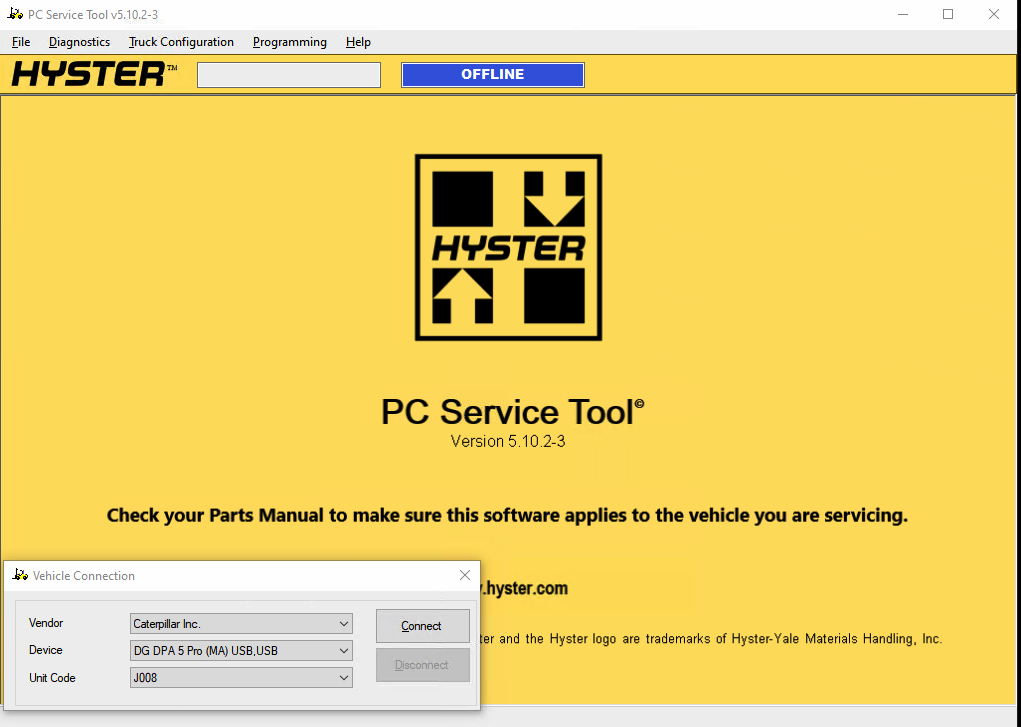
🖼️ Reference Image
The existing reference image carries older-version references in its filename and original alternative text. It is retained for reference rather than as confirmation of the v5.16.6 interface.