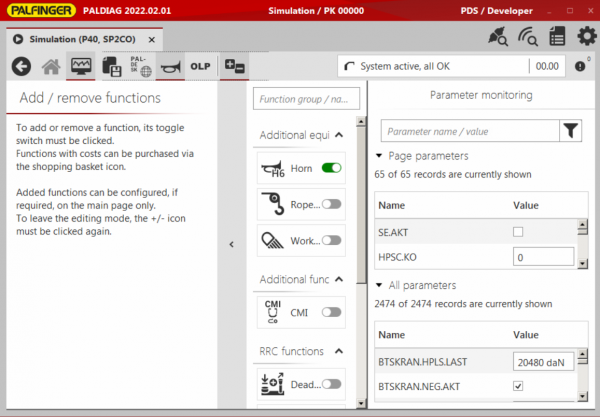


Palfinger PALDIAG v2025.00.01 Diagnostic Tool
Palfinger PALDIAG v2025.00.01 Diagnostic Tool
Couldn't load pickup availability
Palfinger PALDIAG v2025.00.01 Diagnostic Tool
Product Specifications
Update: 2025
Region: All regions
Type: Diagnostic Software for PALFINGER Products
Languages: English, Italian, Russian, Polish, Spanish, French, Portuguese, German, Dutch, Danish
OS: Windows 10, Win 7, Win 8, WIN 11
Number of Discs: 1 .rar file
Instructions: Present
Installation: Choose an option
Version: v3.2.0.0 release 1
Adapters: USB to serial RS232
High speed download link
Instant download after payment, no waiting

About PALDIAG
PALDIAG is the next generation tool for configuration and diagnosis for PALFINGER products. It is a completely new development and it is based on newest software technologies.
With version 2019.00 PALDIAG will support crane control system PALTRONIC 40 as well as RRC Scanreco P2 CAN open (P2CO). From that date, access to PALTRONIC 40 and Scanreco P2CO, by using PALDIAG.NET, is not possible anymore.
All other crane control systems will be supported by PALDIAG step by step. Until implementation, operation is carried out with PALDIAG.NET.
Control Systems Supported in PALDIAG
- Paltronic 40
- Paltronic 90
- Paltronic 180
- Scanreco P2CO
- Paltronic 150 TTC
- Scanreco P3
- Scanreco P6
- Palcon P7
The crane control system PALTRONIC 50 will still be operated in the future with PALDIAG.NET.
Control Systems Supported in PALDIAG.NET
- Paltronic 50
- Paltronic 100
- Paltronic 150
- Paltronic 200
- Palcom P7
- Scanreco P2
- Scanreco P3
- Scanreco P4
- Hetronic BMS2
- PAD
- IFM
New Features in v2025.00.01
- Support of Paltronic 150TTC for Loader Crane
- Optional Paltronic 40 firmware 1.05.03, required for properly adjusting Vmax Nominal speed
- Optional Paltronic 180 firmware 0.30.00
Changes and Improvements
General
- Changed permissions for movement function to control valve section mapping
- Various UI adjustments
P40 Crane / Epsilon / Marine
- Updated parameter for adjusting Vmax Nominal speed
P180 Epsilon Forestry
- Added function "Change protocol"
- Added blocking of movements in encoder calibration until calibration step 3 is active
- Improved error handling
Bug Fixes
- Reconnect after connection lost not working with Wi-Fi adapter
- 2nd slewing limitation remained active after removing high stand