

Yale PC Service Tool v5.16.6 – Forklift Diagnostics
Yale PC Service Tool v5.16.6 – Forklift Diagnostics
Couldn't load pickup availability
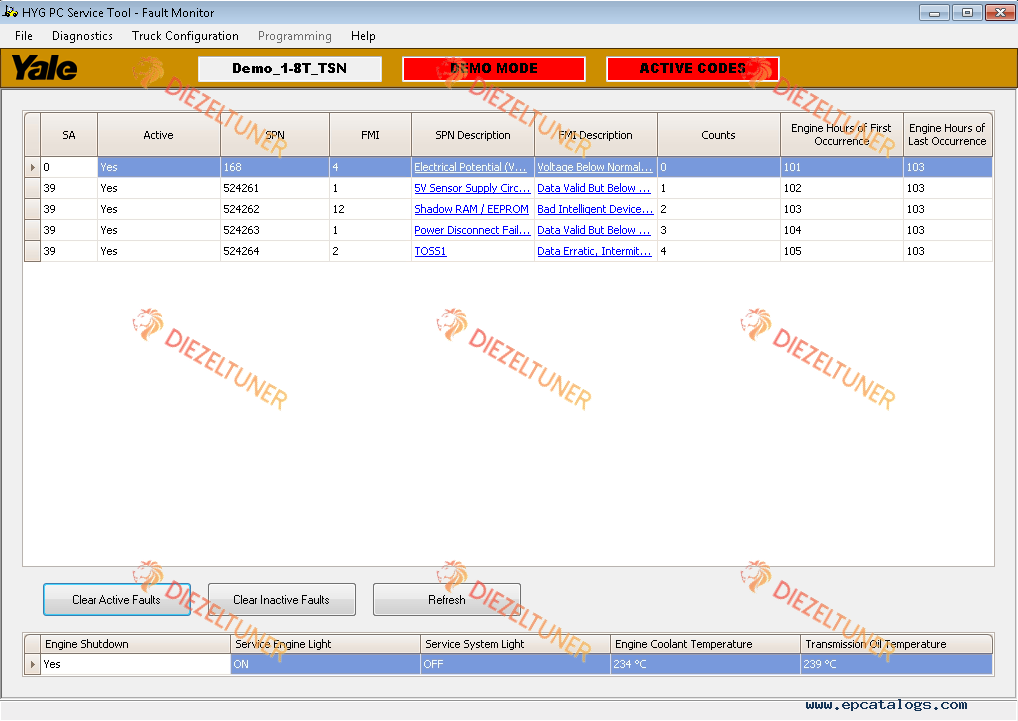
Yale PC Service Tool v5.16.6 is a Windows-based diagnostic application for technicians servicing Yale ICE trucks, Electric Rider trucks and newer Electric Warehouse products. It communicates with internal truck management systems to help monitor systems and components and support diagnosis and corrective service work.
📋 Software Specifications & Installation References
The supplied reference text names both v5.16.6 and v5.5.18. The operating systems, installation requirements, interface entries and unit codes below are retained as reference information; confirm them against your v5.16.6 installation and equipment before purchase.
- 🧩 Product: Yale PC Service Tool v5.16.6
- 💻 Platform: Windows; operating systems listed in the reference are Windows 7, 8.1 and 10
- 🗣️ Languages named: English, Spanish, German and Italian, plus additional languages
- 🌐 Installation reference: Internet Explorer 6 or higher
- 📄 Installation reference: Adobe Acrobat or Adobe Reader 6 or higher
- 🔐 Login and password are required to access the application
🛠️ Diagnostic Purpose & Service Information
- 🔗 Communication with internal truck management systems
- 📊 Monitoring of truck systems and components to assist diagnosis and corrective service work
- 📚 Technical information, tables, diagrams, pictures and screenshots described in the supplied reference
- 🔧 Step-by-step repair and maintenance instructions described within the application
- 🖥️ Guidance for installation, startup and program-menu use
- 🔎 An in-program table of application problems and possible solutions
Package limitation: Troubleshooting manuals are not included in the software package.
🔐 User Access Levels
- 🔍 Diagnostic
- ⚙️ Programming
- 🧩 Development
These are program access levels named in the supplied reference. Available functions depend on the access granted to your login; confirm the access level supplied with your purchase.
🔌 Vendor & Device Reference Entries
Use these entries to check the driver and interface setup for your truck. A listed driver entry is not a guarantee of compatibility with every truck or connection.
- 🔗 ACTIA+ME GMBH: Core XS 1.AUTO, 2.AUTO, 3.AUTO, 4.AUTO, 5.AUTO, 6.AUTO, 7.AUTO and 8.AUTO
- 🔗 Dearborn Group DPA 5 Single Application: DG DPA 5 Dual-CAN (SA) USB.USB
- 🔗 Dearborn Group DPA 5 Multi Application: DG DPA 5 Dual-CAN (MA) USB.USB
- 🔗 DG Dearborn Group: DG DPA 4/4+/5 USB
- 🔗 PEAK-System PCAN Adapter
- 🔗 ACTIA I + ME GmbH: VOCOM II AUTO and VOCOM II WIRELESS
- 🧪 Commins Inc. NEMESIS Mock RP1210 Driver: NEMESIS Mock RP1210
- 🔗 NEXIQ Technologies: EDL3.USB, EDL3.Bluetooth and EDL3.WiFi
- 🔗 NEXIQ BT USB Link: CAN1 125, CAN1 250, CAN1 500, CAN2 125, CAN2 250, CAN2 500, CAN3 125, CAN3 250, CAN3 500, CAN1 1000, CAN2 1000, CAN3 1000, CAN1 Autobaud, CAN2 Autobaud and CAN3 Autobaud
🚜 Unit-Code Reference
Check your equipment unit code against the reference below, then confirm coverage for your installation. Codes are grouped by prefix; the duplicate D809 entry is shown once.
- 🚜 A: A245, A249, A255, A283, A284, A2D4, A372, A390, A3D7, A410, A428, A431, A473, A474, A485, A496, A497, A676, A7T9, A909, A910, A938, A942, A944, A947, A955, A967, A968, A969, A972, A974, A975, A976, A985, A986, A987, A992, A993, A997
- 🚜 B: B287, B292, B295, B2D2, B2D7, B674, B865, B868, B869, B875, B883, B888, B909, B910, B955, B967, B968, B969, B974, B976, B975, B979
- 🚜 C: C287, C292, C295, C809, C810, C845, C846, C852, C854, C855, C856, C860, C862, C875, C878, C879, C883, C888, C889, C896, C892, C902, C903, C909, C910
- 🚜 D: D801, D809, D810, D843, D847, D849, D852, D861, D875, D878, D879, D889, D896, D902, D909, D910
- 🚜 E: E809, E810, E815, E818, E826, E842, E843, E857, E861, E875, E878, E879, E889, E896
- 🚜 F: F813, F818, F878, F879
- 🚜 G: G807, G813, G818, G878, G879
- 🚜 H: H807, H813, H878
- 🚜 J: J813, J876, J877
- 🚜 K: K813, K876
Share